PEEK // system metrics, on a desk
github.com/rhshourav/PeekESP

My home server is in Kushtia.
I live in Dhaka.

That is a long drive to answer “is it still running?” — and for months the answer was to SSH in when I remembered, find everything fine, and close the terminal.

PeekESP is a 1.14″ screen on my desk that just tells me. CPU, memory, storage, temperature and throughput for that machine, updating every five seconds, 250 km away.

Arduino + LVGL · Android · Cloudflare Worker · MIT licensed

PEEK // kushtia-server 1/2 42 ms 42 CPU % 78 RAM % TEMP 48° RX 1.3M TX 113k STORAGE 436G FREE 61% up 3d 4h LINK OK PEEK // dhaka-laptop 2/2 18 ms 91 CPU % 55 RAM % TEMP 71° RX 88k BAT 64%+ STORAGE 33G FREE 93% up 2h 35m LINK OK PEEK // DHAKA --:-- -- -- waiting for time no NTP sync yet PEEK // POWER 81% 4.02 V CHARGING kushtia-server — no battery hold right to sleep

240 × 135, at the panel’s real resolution. The buttons work like the board’s.

The problem

Nothing can connect to a machine behind CGNAT.

Home broadband in Kushtia sits behind carrier-grade NAT. There is no port to forward, no inbound connection to accept, and no amount of router configuration changes that — the address is not mine to open.

A VPN was the next thought and also wrong. An ESP32 cannot join a Tailscale network at all: Tailscale is WireGuard plus a control plane — node registration, rotating keys, DERP relays — and none of that has an embedded client. Plain WireGuard was possible, and this project used to do it, but it needed the monitored host to accept an inbound connection. Which is where we came in.

So both ends dial out instead.

Kushtia
agent pushes
▶▶POST /ingest
Cloudflare Worker
holds the last reading
◀◀GET /telemetry
Dhaka
display polls

Neither side listens. Nothing needs an inbound port, which is what makes this work behind CGNAT or on a network you do not administer.


Setup

Ten characters, typed once.

The device shows a code on first boot. You type it into the desktop or Android app. That is the whole configuration — no account, no token to copy, no port to open.

Both sides derive the stream and both auth tokens from that code locally. The relay never sees it, which is why pairing needs no secrets configured on the Worker at all.

# the same three lines in every client
stream = SHA-256("peek-stream:" + CODE)  first 16 hex
push   = SHA-256("peek-push:"   + CODE)  first 48 hex
read   = SHA-256("peek-read:"   + CODE)  first 48 hex

C++ on the device, Python in the app and the Linux agent, JavaScript in the Worker — all pinned against vectors generated by openssl. A drift between any two would have a machine pushing to a stream the device never reads, with every request still looking valid from both ends.

The alphabet drops I, O, 0 and 1: those are the pairs people mistype reading a code off a screen this size. Ten characters from the remaining 32 is 250.
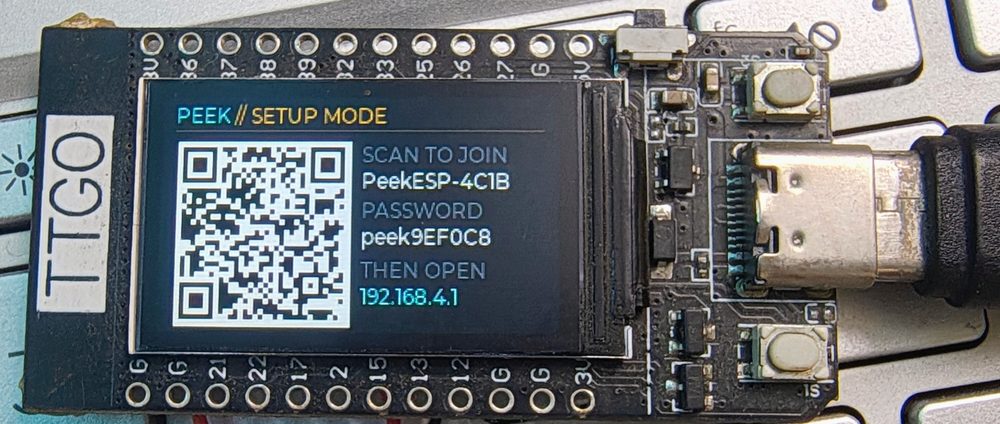
The device in setup mode, showing a QR code beside the access point name PeekESP-4C1B, its generated password, and the address 192.168.4.1.
First boot raises its own access point. The QR encodes a WIFI: join string, so a phone camera joins it directly rather than anyone reading a generated password off a 1.14″ panel.
On the device

One button walks the pages.

A pairing code identifies a person, not a machine. Run the agent on a desktop, a laptop and a Pi with the same code and all three appear here. Six per code.

01–06

Each machine

CPU and memory arcs, temperature and throughput, storage across every fixed disk with free space beside it. Swiping costs nothing: one poll already carried them all, so the display makes the same number of requests whether it shows one machine or six.

07

Clock

Local time from the NTP sync the TLS handshake needed anyway, with a bar that fills across the minute so the page never looks frozen. The offset is stored in minutes, because Kathmandu is +5:45 and an hours-only field silently cannot express that.

08

Power

The board’s own cell, and the monitored machine’s battery underneath it. While a charger holds the node up there is no percentage shown at all — that voltage is the charger’s, not the cell’s state of charge, and reporting it as one reads “100 %” against an almost empty battery.

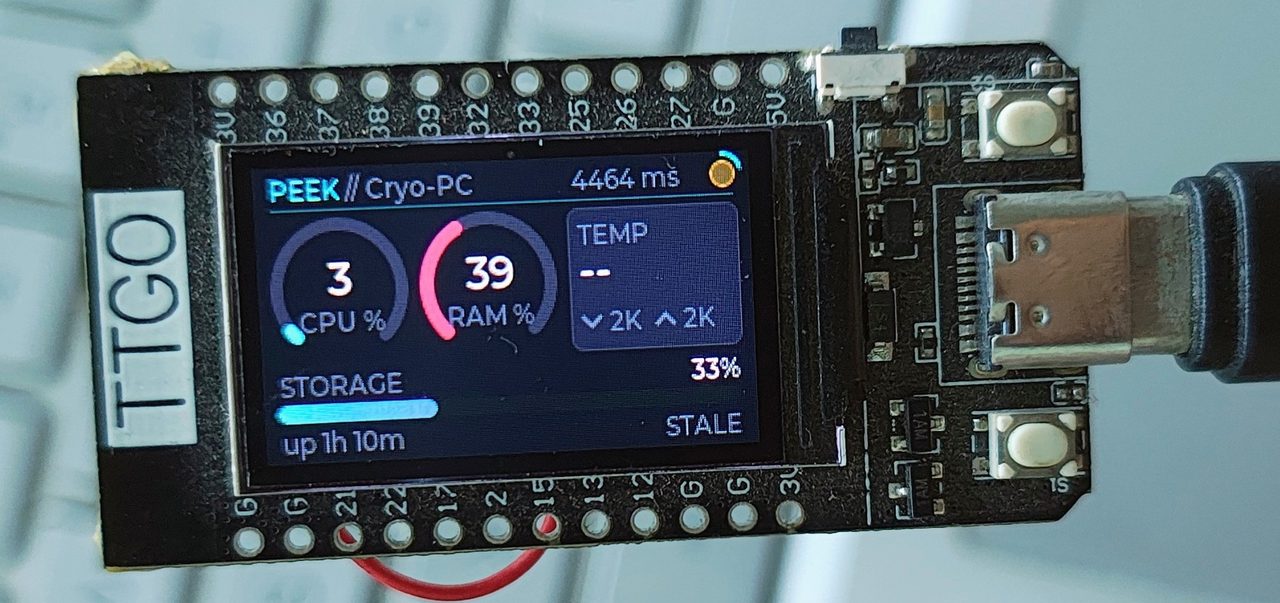
The PeekESP dashboard running on a LilyGO TTGO T-Display, wired on a desk.
A LilyGO TTGO T-Display. The whole thing is the board, a USB cable, and about 1.3 MB of firmware.

When a machine goes quiet

After five polls bring nothing newer, its readings grey out and its name turns amber. The age is counted on the device’s own clock, not the relay’s timestamp — that field only refreshes when a poll succeeds, so when the network drops it freezes and the machine goes on reporting up 3d 4h indefinitely. Live-looking numbers behind a dead link is the one failure a monitor must not have.


On your phone

The same readings on your home screen.

The Android app reads the same relay with the same code, so a phone, a desk display and Home Assistant can all watch the same machines at once. The ESP32 is optional.

Join a network

Type the code your device or agents already use. Dashes and case are ignored.

Create a network

The app generates a code. Give that code to each agent, the same way you would give it to the Windows app.

Add the widget

CPU and RAM, storage, temperature, throughput, uptime and link status — whichever the machine reports — without opening the app.

Requires
Android 8.1 or newer
Install from
PeekESP.apk, latest release
Google Play
coming soon
Machines per code
6

Android will ask you to allow installs from your browser or file manager the first time. Switch that permission off again afterwards.


Install

Pick a platform. One code.

Windows
winget install rhshourav.PeekESP
Linux · DietPi, Debian, Raspberry Pi OS
curl -fsSL https://raw.githubusercontent.com/\
rhshourav/PeekESP/main/dietpi/install.sh | sudo sh

Asks for the pairing code, installs a hardened systemd service, and waits to confirm the machine is actually pushing before it says it worked. Then peekesp status, peekesp logs -f, sudo peekesp uninstall.

The board
python tools/flash.py

Writes the prebuilt image. No Arduino IDE, no ESP32 core, no libraries — the only download is esptool.

Android

Download PeekESP.apk from the latest release and open it.

Needs Android 8.1 or newer. Not on Google Play yet. More on the app.

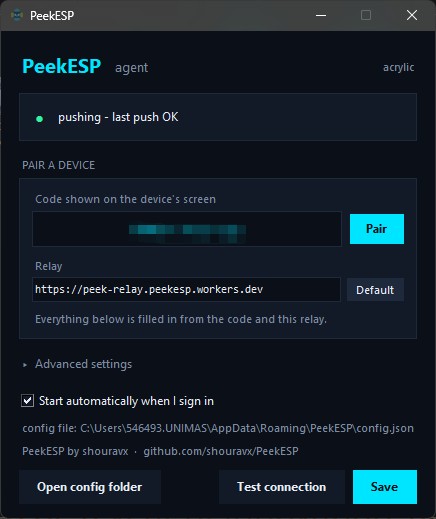
The PeekESP settings window on Windows: a status line reading pushing - last push OK, a field for the pairing code, and the relay address already filled in.
Everything below the code is derived from it. The status line answers “did it work” on the same screen where you typed it.
Board
LilyGO TTGO T-Display
Panel
ST7789V · 240×135
Firmware
1.29 MB · 42% of 3 MB
Poll interval
5 s, configurable
Machines per code
6
WiFi networks
5
Worker tests
74 unit · 17 live
Android
8.1 or newer
Release
v1.2.1
Licence
MIT

Before you build one

What this does not do.

The Windows binaries are unsigned

SmartScreen will warn the first time — More info → Run anyway. A self-signed certificate would not help: it is trusted by exactly one machine, and the Microsoft tooling that offers to make one says “for testing purposes only” in its own documentation. A real one needs a hardware token and a yearly fee.

The free tier is a request budget, not a device count

Each agent costs 17,280 requests a day at a five-second interval, and so does each display — and each phone or widget that polls — against Cloudflare’s 100,000. One display and two machines fits comfortably; four is close to the edge. Raising the interval to 15 s divides everything by three.

The Android app is a sideload for now

It is not on Google Play yet, so you install the APK from the release page and it will not update itself — install the next release over the top. Android also decides how often a widget may refresh, so it updates far less often than the display does.

Pairing is trust-on-first-use

The guarantee is precisely “once a role is claimed, only that token works” — not “only the right token was ever possible”. Squatting an unclaimed stream needs the 16-hex stream id, which needs the code, which only ever appears on the device’s screen.

2.4 GHz only, and no over-the-air updates

An ESP32 has no 5 GHz radio, so a network missing from the scan is usually 5 GHz-only rather than a fault. And the partition table has a single app slot, so new firmware means a USB cable — fine for a display on your desk, which is where this one lives.